 |
SPREADSHEETS are notoriously difficult to
validate. Undetected errors have caused large financial losses and
expensive litigation. The Spreadsheet
Detective provides many features that can reduce errors and
aid in model risk management. |
The Case of the Invisible Spreadsheet Errors...
The mob wants to rub out the North Side gang, but will the massacre pay? No self respecting gangster would take such action without first building a spreadsheet. But it won't balance! Can the Spreadsheet Detective save the day? Stay tuned to find out...
Microsoft Excel Spreadsheet Audit Features
The Spreadsheet Detective is used by thousands of spreadsheet professionals to:-
- Provide an overview with comprehensive workbook reports, data flow analysis and error detection.
- Show which cells have formulas and how they have been copied throughout a model.
- Clarify cryptic "A1" references using English AutoNames.
- Use a non modal window to describe many aspects of the current cell and formula.
- Evaluate intermediate values and cell references of complex formulas.
- Easily follow complex precedent and dependent relationships.
- Compare different spreadsheets with both a succinct report and
graphical annotations.
- Manage Scenarios, and perform Monte Carlo simulations.
- Encrypt sensitive workbooks without the risk of losing the password.
- Analyze sensitivity relationships.
- Assist with the understanding and manipulation of Named Ranges.
- And much more...
Bottom Line —  Research
"Spreadsheet Detective is
one of the
longest established and most comprehensive suites of auditing tools
that we have seen. This is not to say that other products may not have
features that are not in Spreadsheet Detective or that, in some
instances, we might prefer a competitor’s implementation of a
particular feature but, overall, the product is clearly the market
leader, and deservedly so."Read full extract.
Compliance Detective — End User Computing Model Risk Management
(MRM)
The
Compliance Detective can record meta data about spreadsheet models that
document their risk profile. It can then produce company wide reports
of the models, their risk profile, and when they had formulas (as
opposed
to data) changed.
Rules can be provided as to when formal reviews are required, and the
tool can then track who has reviewed them.
The Compliance Detective can quickly scan large repositories such as
Box.com, and can optionally utilize its own cloud services.
It has been used effectively by a large financial services company that
has thousands of spreadsheet analysts. More...
Stress Testing Spreadsheet Models
A key aspect of model risk management is to stress test each model to determine how its predictions will vary based on different assumptions. The Spreadsheet Detective provide an advanced scenario manager that can manage this process, as well as automatically generating different combinations of assumption parameters.European Users Spreadsheet Risk Interest Group (EuSpRiG)
The EuSpRiG.org is the
main center for research into the nature and seriousness of spreadsheet
errors, as well as methods to avoid them. Their website contains
many academic and industry papers, plus links to researchers in the
field.They also provide a list of some very public failures at eusprig.org/horror-stories.htm. However, most failures are never publicized.
The Spreadsheet Detective is a proud sponsor of EuSpRiG.

Excel Spreadsheets Risks & Sarbanes-Oxley (SOX)
The following is an extract from The Use of Spreadsheets: Considerations for Section 404 of the Sarbanes-Oxley Act PricewaterhouseCoopers:-“Anecdotal evidence suggests that 20% to 40% of spreadsheets have errors, but recent audits of 54 spreadsheets found that 49 (or 91%) had errors, according to research by Raymond R. Panko, a professor at the University of Hawaii.”
"The Journal of Property Management stated, “30 to 90 percent of all spreadsheets suffer from at least one major user error. The range in error rates depends on the complexity of the spreadsheet being tested. In addition, none of the tests included spreadsheets with more than 200 line items where the probability of error approaches 100 percent.”
"Perform an on line search for spreadsheet errors or spreadsheet audit, and you will find a number of major failures attributed to spreadsheet inaccuracies that hit the press in the past year alone."
The Original Spreadsheet Detective
The Spreadsheet
Detective has been revealing modeling errors since
1997. Many features have been added since that time based on
extensive customer feedback. Other less established spreadsheet
auditing tools may offer
some superficially similar features, but they lack the depth and
quality of the Spreadsheet Detective.
The Spreadsheet Detective has thousands of active users. Companies with site licenses include:
 |
 |
 |
 |
 |
 |
 |
 |
 |
 |
 |
 |
(Libre/Open Office Calc Detective)
(The Spreadsheet Detective should not be confused with the "Detective" feature in Libre/Open Office Calc which just provides similar features to Excel's in built audit arrows. The Spreadsheet Detective has been available since 1997, and the use of the same name for the Calc feature is unfortunate. Generally, while Calc may be an adequate tool for the casual spreadsheet user, it is not recommended for developing serious quantitative models.)
Pricing and Support
The Detective is priced very reasonably as
can be seen on the Price List.
There is also a Free Download available.
Excel versions are supported from Office 365 down to Excel 2010. Please direct any questions to the email below. The Spreadsheet Detective is an essential tool when building complex Excel spreadsheets.
E-Mail: info@spreadsheetdetective.comSouthern Cross Software
Queensland Pty Ltd ABN 41 079 368 200 https://www.SpreadsheetDetective.com
See the Video Tutorials for details
Comprehensive Workbook Report
Provides a bird's eye view of complex models by summarizing each worksheet, highlighting potential error conditions, showing data flow between each worksheet, references to external workbooks etc.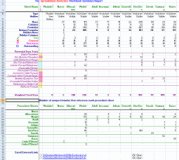
Distinct and Copied Formulas
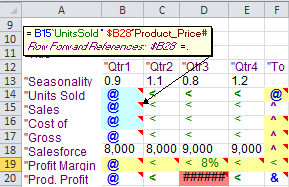
Cell shading clearly shows which cells have formulas, and how they have (or have not!) been copied throughout a spreadsheet. Bold shading highlights inconsistent formulas on larger models. The shading is on the actual model, so that it can be seen while the model is being developed.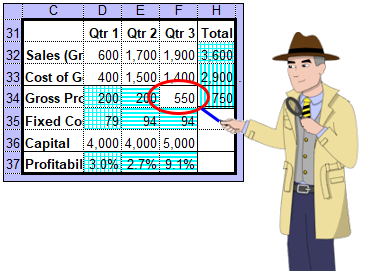
Formula Dialog
Pretty prints the formula in the active cell so that complex formulas are easy to read. Each of the cell references are hyperlinks so clicking on them goes quickly to the corresponding precedent. Hovering over cells, functions or operators also shows their evaluated values. Unused branches of IFs are grayed out.Cell references are also annotated with green "English" AutoNames that clarify their meanings. Issues and potential errors are shown in purple below, with the corresponding fragments of the formula shown in red. These include things that might be hidden such as named range descriptions, locked cell status, validations and conditional formats. Other annotations show the source of error values.
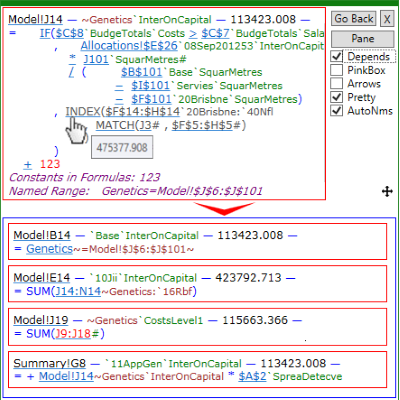
The dialog is non-modal and automatically tracks the active cell, although it is temporarily frozen when examining precedents. There are also several keyboard shortcuts.
Dependent cells may also be displayed, with ranges of dependent cells collapsed into a single reference. There is also an option to show how formulas are copied, and to display the dialog in a task pane.
Formula AutoName Report
Provides a complete list of all distinct formulas and named ranges. AutoNames clarify cryptic A1 references.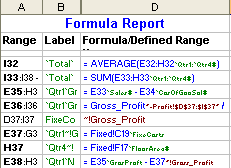
Audit Process Control
Mark formulas as verified, questionable or erroneous. Collate them in a workbook audit status report. Control your communications with the model author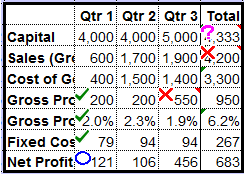
Scenarios and Monte Carlo Simulation
Consider different scenarios or perform full Monte Carlo simulations. Manage uncertainty and avoid the flaw of averages.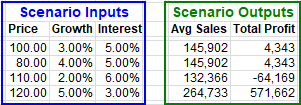
Full Graphical Formula Annotations
Completely describes a model by annotating the spreadsheet itself.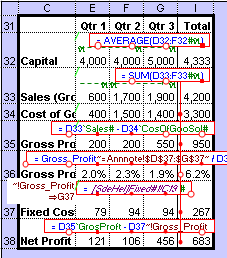
Worksheet Comparison
Clearly shows changes between different versions of a model even if rows or columns have been inserted or deleted. Provides both annotations and a succinct report by unifying changed copies of a formula. Shows which parts of complex formulas have changed. Can also compare different parts of the same worksheet.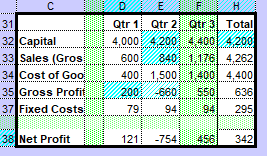
Quick Model Navigator
Quickly navigate to worksheets or named ranges by just typing a few characters from their name.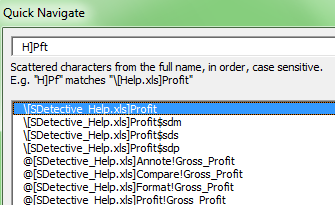
A shortcut manager also enables arbitrary keyboard shortcuts to be assigned to any command, not just those from Spreadsheet Detective
Master Key Encryption
You know you should encrypt your extremely sensitive workbooks, but what if you lose the password? Master key encryption makes protecting your data practical.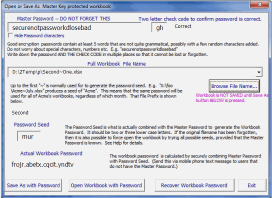
Precedents & Dependents Reports
Provide a detailed outline report to see where values is comming from and where they are going.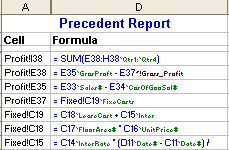
Workbook Discovery
Discover where your spreadsheet models are, and what other models link to them.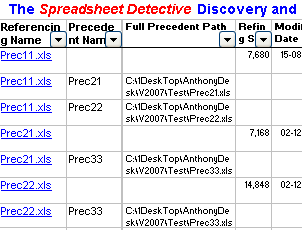
Sensitivity Analysis
Obtain a new perspective by examining each formula's sensitivity.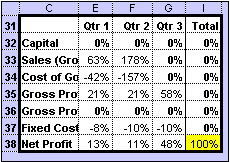
Named Range Dialog
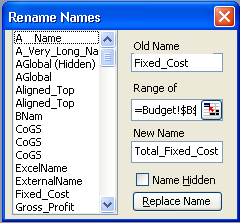
View and edit named ranges, easily verifiy their definitions and automatically update the formulas that use them.